You open the inbox on a Tuesday with three colleagues waiting, and the first screen is already an argument. Fifty items, newest first, each a row with a title, a truncated message, a priority tag and a status word. Some were typed by a visitor into a widget on a pricing page; some were carried over from an AI review of that same page. Every one says New, because every item is created at status new and nobody has ruled on any of them.
Forty minutes later the usual thing has happened. The team read most of the page, agreed that several items were interesting, found two more problems while discussing the first, and left with a longer list than it started with. Nothing in the inbox changed, so the decisions live in four people's memory, which means that by Thursday they live nowhere.
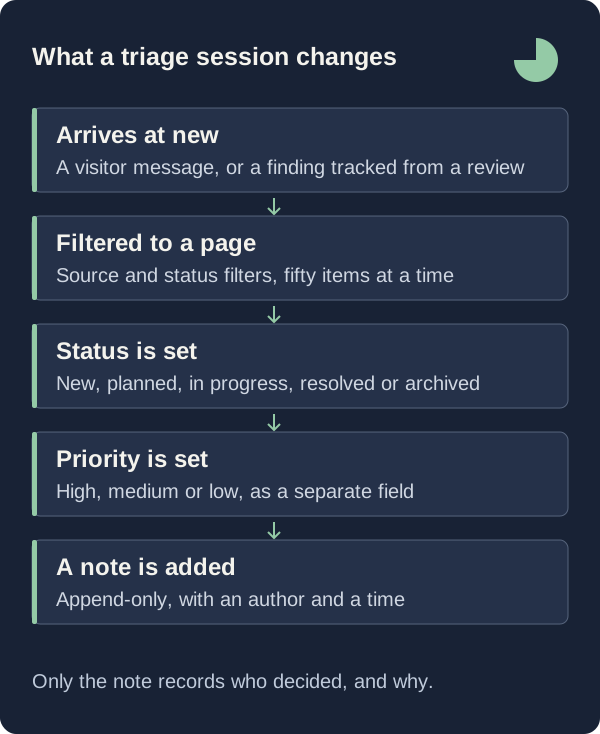
The inbox is built for the other outcome. A feedback item has exactly five statuses, exactly three priorities, a source that is either human or ai, and a comment thread in its own table carrying an author name and a timestamp on every note. That vocabulary is deliberately small, because a session that has to invent its own labels spends the hour inventing labels.
A session that ends in decisions has a checkable finish: every item you opened carries a status you chose on purpose, a priority you accepted or changed, and one note saying why. What follows is how the filters, the status enumeration and the comment thread make that finish reachable in a single sitting, and where the product stops helping.

Read The Two Tabs As Two Different Claims
The instinctive reading is that the inbox is one queue of problems ordered by arrival, and the list encourages it: a visitor submission and a tracked AI finding share the same row layout, the same priority tag and the same status word, differing only in the corner icon, a message glyph for one and a sparkle for the other.
That reading misclassifies half the queue. A visitor submission reports something a person experienced, between 10 and 5,000 characters, sometimes with a rating from 1 to 5. A tracked finding is an interpretation of public page text produced by a model, and the review page says so in its own words: “These are AI interpretations, not accounts from real visitors. Use them to form better questions and decide what to test.”
So run two passes, using the control the inbox already provides. The tab strip sets the source filter to the empty string, to human, or to ai, labelled “All feedback”, “Real people” and “AI findings”, and the backend turns that into a predicate on the stored source field. In the human pass you decide whether a reported experience is worth acting on; in the AI pass, whether an interpretation is worth verifying.
Bound The Session To One Filtered Page
The common ambition is to clear the inbox, and it is the wrong target: the widget accepts up to 20 submissions an hour from one hashed visitor identity and 200 a minute for a site, so the queue is a stream rather than a pile, and a session judged against emptiness always fails.
Bound it by the page instead. A query returns 50 items by default and 100 at most, newest first with the row id as a tiebreak, and paging is a keyset cursor holding the timestamp and id of the last row you saw, stable while new feedback arrives mid-meeting. The only way to the next page is the “Load more perspectives” button, which makes extending the session something a person says out loud.
Narrow before you start. The search box takes up to 200 characters, waits 250 milliseconds before querying, escapes the wildcard characters, and matches title and message together, so a term like refund finds items that never used the word bug. Site access is checked on every request, so a teammate scoped to one website sees only that website whatever the filter says.
Let The Five Statuses Carry The Decision
Most teams want a vocabulary of their own: triaged, needs design, waiting on the customer, will not fix. GreatFeedback does not offer one. Status is an enumeration of exactly new, planned, in_progress, resolved and archived, validated on the way in. Everything starts at new, whether a visitor submitted it or a finding was tracked into the inbox, so new means only that no human has ruled on it.
The constraint is the feature. Planned is a commitment to act, in progress says someone started, resolved says the work is finished, and archived is the one that lets a session end: a recorded decision not to act, not a delete. The row stays in the table, stays exportable, and returns the moment the status filter is set to Archived. A team that cannot say no inside the tool says no by leaving items at new forever.
Priority is a separate axis with three values, set from a second select beside the status one. A visitor submission is always created at medium, because no visitor is asked to rank their own report. A tracked finding is created at the severity the model assigned, so a machine chose the priority you are about to inherit: accept it or change it deliberately. Both selects render only for a role that can write, and the server independently requires at least the member role.
Write The Decision Into The Comment Thread
The tempting shortcut is to encode the decision in the item itself. The patch endpoint accepts a title of up to 140 characters, so you could rewrite a report as “Annual toggle: deferred” and move on. Resist it: a rewritten title destroys the visitor's own phrasing, the one part of the record you did not author.
Comments live in their own table, 1 to 5,000 characters each, stamped with the author id, display name and creation time, returned with the item oldest first, and written to the audit log as a feedback.commented action. There is a create route, no edit route and no delete route. A note is append-only, so a changed mind arrives as a second note rather than a quiet correction of the first.
The panel asks for the right thing: the empty state reads “No team notes yet. Add the detail that will help someone take the next step”, and the placeholder starts the sentence, “Worth trying in the next release because…”. For a human report, name the outcome at risk and the smallest change that would test it. For a finding, name what you will verify, because the review behind it tested no visual layout, no live interaction, no page speed, no accessibility compliance and no logged-in workflow.
What This Does Not Tell You
There is no assignee and no due date. The stored record holds a source, a title, a message, a category, a page address, a priority, a status, two timestamps and the optional visitor or finding context, and nothing that holds a person. The only place a name attaches to a commitment is the author name on a comment, so “Dana will check this by Friday” has to be typed into the thread or it does not exist.
Status changes are not attributed either. Adding a comment writes an audit entry; changing status or priority patches the record, refreshes the updated timestamp and emits a change event, but writes no audit row and keeps no previous value. You can see that an item is planned. You cannot see who planned it, when it left new, or whether it had been resolved once already.
The list is also less sortable than it looks. The query accepts a search term, a source, a status, a site, a cursor and a page size and nothing else, so there is no priority filter and no alternative ordering: high-priority items are found by reading tags on a page ordered by recency. The count beside “All feedback” is the workspace's lifetime feedback count for a workspace-scoped member and the current page size for a site-scoped one, not a count of what your filters matched. The CSV export carries ten fields, which exclude the quoted evidence and the confidence rating.
First Steps
A first session needs a scope you can finish and an artefact that outlives the meeting. Run it against one website, one source and one status, and stop at the end of the page rather than at the end of the queue.
- Open the inbox, select one website, choose the "Real people" tab, set the status filter to New, and work only the 50 items on that page.
- For each item you open, set a status from the five and a priority from the three, then add one team note naming the outcome at risk and the next action; an item left at new is an item the next session reads again from the beginning.
- Run a second pass on the "AI findings" tab: read the quoted evidence, write the check you intend to run into the thread, and archive the findings you will not verify instead of leaving them queued.
Close The Loop Before You Add More Work
The next session starts where this one ended, and the way to start it well is to read the active set first: filter to Planned and to In progress before touching anything new, and ask what moved. An item planned six weeks ago with no second comment is telling you the commitment was never real.
The tool supplies the shared record, the fixed vocabulary, the attributed thread and an append-only history of what your team said. It supplies no judgment: it will not tell you that one visitor speaks for many, nor that a finding backed by a quotation is worth acting on. What the five statuses and the comment thread give you is a way to make a judgment once, in a room, and find it again later in the words you used at the time.