A designer opens the inbox on a Tuesday morning and finds eleven words: “This page is confusing and I gave up trying.” Underneath sits one grey line, and that line is all the visitor’s browser sent with the complaint: “Anonymous visitor · 390 × 844 viewport · Selected: button: Compare plans.” There is no recording, no screenshot, no account to look up.
The instinct is to wish for instrumentation. The GreatFeedback widget declines to provide it, and says so in the first line of its own source file: “No dependencies, no cookies, no passive recording.” Every request uses credentials: 'omit', so nothing the visitor is signed into travels with the report, and before the payload leaves the browser the widget empties page.search and page.hash, so the query parameters that would have named the applied filter are gone by design.
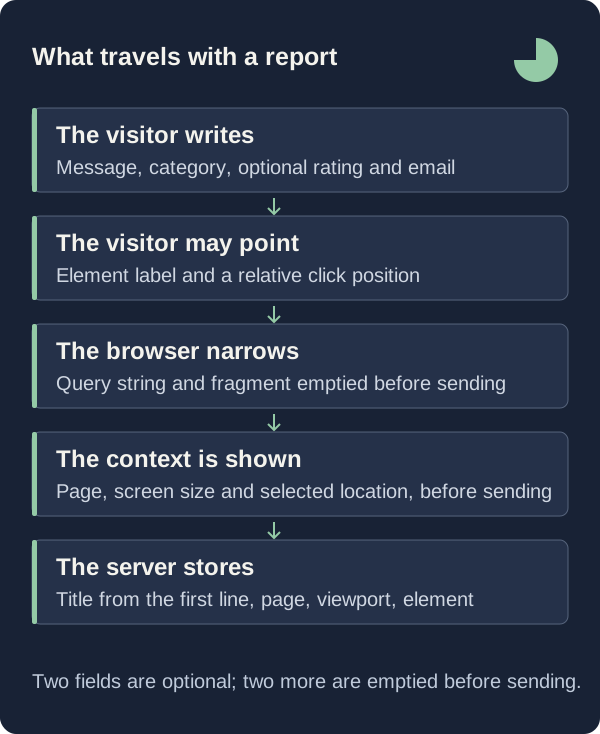
What survives fits in one sentence: the message, a category, an optional rating, an optional email address, the page address without its query string, the viewport size, and, when the visitor attaches one, an element label with two normalised coordinates. Nine fields, one of which carries almost all of the meaning.
The difference between “this page is confusing” and a report somebody can act on is therefore not made by the widget. It is made in the 120 characters of opening question you write before the visitor types, and in the note you attach after the submission lands.

Read The Payload Before You Write The Question
The instinctive feedback form collects what an engineer would want: browser, operating system, steps to reproduce, a screenshot, the account identifier. None of it is accepted here. The intake schema takes a submission identifier, a message of 10 to 5,000 characters, a category drawn from exactly four values, an optional rating of 1 to 5, an optional email address of at most 254 characters, a page address, a viewport size clamped to 100 through 16,000, an element label of at most 200 characters, two coordinates between 0 and 1, and a hidden honeypot.
The server repeats that discretion rather than relaxing it: the page address is canonicalised again on arrival, its search and hash stripped a second time, and the request is refused when the address does not match the Origin header, which must itself appear in the website’s allowed list, which holds the site's own origin plus up to ten more or the response is a 403 reading “This website is not enabled for this feedback widget.”
So the message field, at 5,000 characters, has more room than every other field combined, and it is the only one whose contents you can influence. Whatever the schema does not carry has to arrive inside it, which makes the question printed above the textarea do work that instrumentation does elsewhere.
Spend The Opening Question On The Expectation
The temptation is to spend the one configurable string on the mechanism: “Report a bug”, or the shipped default, “What could be better?” Both duplicate what the widget already handles. The visitor picks a category from four fixed radio buttons rendered as Idea, Bug, Love and Other, and the textarea already carries the fixed label “What’s on your mind?” Those strings live in the widget file. The heading is the single piece of copy you control, and the schema caps it at 120 characters.
Spend it on the expectation, which is the one thing neither the page address nor the coordinates can reconstruct. A second reason sits in the intake route: the server derives the feedback title by taking the first line of the message and slicing it to 140 characters, and the inbox prints the remainder beneath that title. The first sentence the visitor writes becomes the headline you triage on.
The question therefore shapes the index, not only the content. “What were you trying to do on this page?” tends to produce a first line that states a goal, and a title a reader can rank without opening the item. “Any thoughts?” tends to produce a greeting, and a title that forces every item open before it can be ranked.
Let The Visitor Point Instead Of Describe
Asking a visitor to describe where they got stuck produces prose such as “the button on the right, near the prices”, which is why most feedback tools reach for session replay or a heatmap. GreatFeedback has neither, and its widget settings page says so in a checklist: no silent session recording, no tracking cookies from the widget, page queries and fragments removed.
The substitute is one deliberate act. The visitor presses “Point to something on this page”, a banner reading “Click a spot to include its location.” appears, and the next click outside the widget is intercepted in the capture phase rather than delivered to the page. From it the widget records an element label, the lowercased tag name plus any aria-label truncated to 140 characters, and two coordinates, the click position divided by the window’s inner width and height and clamped to 0 through 1.
Whether that label is useful was decided by your markup months earlier. A labelled control arrives as “button: Compare plans” and locates the confusion precisely; an unlabelled wrapper arrives as “div” and locates nothing. Naming interactive elements is normally argued on assistive-technology grounds, and here it is also the difference between a report you can place in a minute and one you cannot place at all.
Show What Travels At The Moment Of Sending
The usual place to explain data handling is a privacy page in the footer, read by almost nobody while they are deciding whether to complain. The widget puts the disclosure inside the dialog instead, above the submit control, as three rows: Page, Screen, and Selected location, which reads “No location selected” until a pin is attached. They refresh on resize, on history navigation and whenever focus enters the form, so what is shown is what will be sent.
Beneath them sits one line of fine print, verbatim: “Your message, optional email/rating and the context shown above go to the website team. Query parameters and fragments are removed. No session recording.” The claim is checkable from the file that makes it: the widget mounts in an open shadow root with all:initial, inheriting nothing from the host page and leaking nothing into it, and both its configuration request and its submission pass credentials: 'omit'.
Abuse control costs the honest visitor nothing. A hidden field named website sits in the form for automated agents to fill, and a non-empty value returns 422 with “This submission could not be accepted.” Two rate limits follow: 20 submissions per hour per identity and 200 per minute per website, keyed by an HMAC-SHA256 hash of the network address rather than the address itself. No challenge stands in the visitor’s way.
What This Does Not Tell You
The stripped address is the sharpest limit. A report about a filtered list, a search results page, or a form that keeps its position after the question mark arrives pointing at the bare page, because the search string is discarded in the browser and again on the server. Recovering that state requires asking, and the only channel is the optional email field, which nothing writes to automatically: the backend sends mail for authentication and team invitations and for nothing else, so a reply is a human action taken outside the product.
The coordinates are weaker than they look. They are clientX and clientY divided by the window’s inner width and height at the instant of the click, so they describe a position on the screen rather than in the document, and no scroll offset is recorded. On a page three screens tall, 0.42 by 0.61 against a 390 × 844 viewport narrows the search to one screen. Read the element label first and treat the coordinates as a refinement of it.
Volume tells you nothing either. The 20 per hour and 200 per minute are ceilings against abuse, not a sampling frame, and one located report justifies an investigation without describing how visitors in general behave. Duplicate handling is equally narrow: a retried send of the same submission identifier within 24 hours returns the feedback already stored, while any edit generates a fresh identifier, so a visitor who revises and sends again creates a second item.
First Steps
Three changes make the small payload carry more, and each is checkable on the page itself. Take them in order, because the third is only testable once the second is in place.
- Rewrite the opening question in website settings as a request for the expectation, inside the 120-character limit, and save it so the widget serves the new text from its configuration call.
- Send a test submission from the published page with a location attached, then open the item in the inbox and confirm the page address, the viewport figures and the Selected line let a colleague find the same spot without asking you.
- Add an aria-label to every interactive element on that page that arrives as a bare tag name, then repeat the test until the Selected line names the control rather than its container.
Turn One Located Report Into A Decision
Reconstruction is manual and short. Open the source page from the item, size the window near the recorded viewport, look at the named element, and read the message again with that in front of you. Then write into the item what the payload cannot hold: a team note of up to 5,000 characters, under the panel heading “Keep the context together”, separating what the visitor said from what you now believe. Set the status and the priority, so the record ends in a decision rather than an impression.
The widget stays small because it refuses to take what the visitor did not offer, and that refusal moves the work to the two moments you control: the 120 characters that shape what they write, and the note that fixes what you concluded. Give both the seriousness you would give a checkout flow, and the vague report stops being the common case.