At 10:40 on a Tuesday a product marketer pasted one script tag above the closing body tag of the marketing site, published, and opened the homepage. The Feedback button appeared in the bottom right corner, as promised. She opened Your widget, pressed Check connection, and read the sentence the product gave back: "Widget connected: your website has loaded it successfully". She told the team the widget was live.
Three days later the inbox held nothing at all. The marketing site is served from the www host, because the apex domain redirects there, and the address recorded in the workspace was the apex. Every visitor on www loaded a script that asked the API for its configuration, received a 403 carrying "This website is not enabled for this feedback widget.", and stopped there, rendering no button, showing no error and reporting nothing back to the workspace.
The green tag was truthful and nearly useless. It records that one browser, on one origin that happened to be registered, completed one configuration request at some point in the past; the timestamp behind it, last_seen_at, is written by the configuration endpoint alone and rewritten only when it is absent or older than sixty seconds. It does not name the origin and it does not expire.
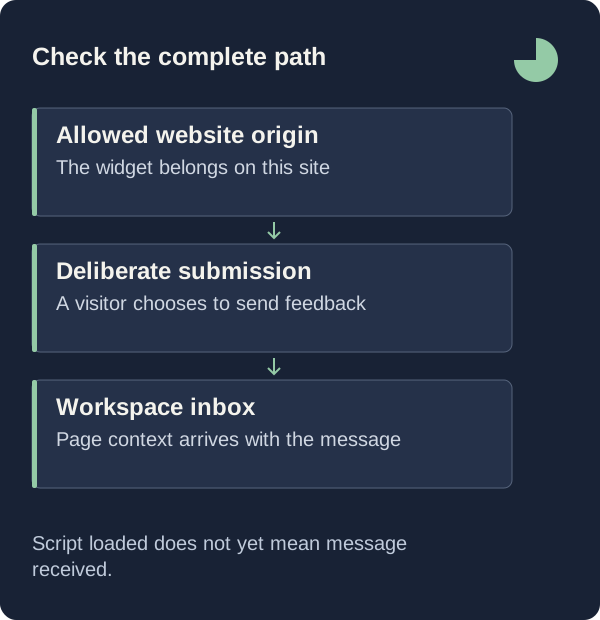
A launch check worth running follows the path a visitor follows: the exact origin string in the Origin header, a message long enough for the schema, a page address the server can match against that origin, a rate budget the team does not exhaust in one morning, and an inbox entry someone else can act on.

Loading Is Not Delivery
The instinctive check is the button the product puts in front of you. Check connection reloads the workspace and reports either that sentence or "Not seen yet. Publish the script, open your website, then check again." The tag beside the website selector reads Widget paused, Widget connected or Ready to install.
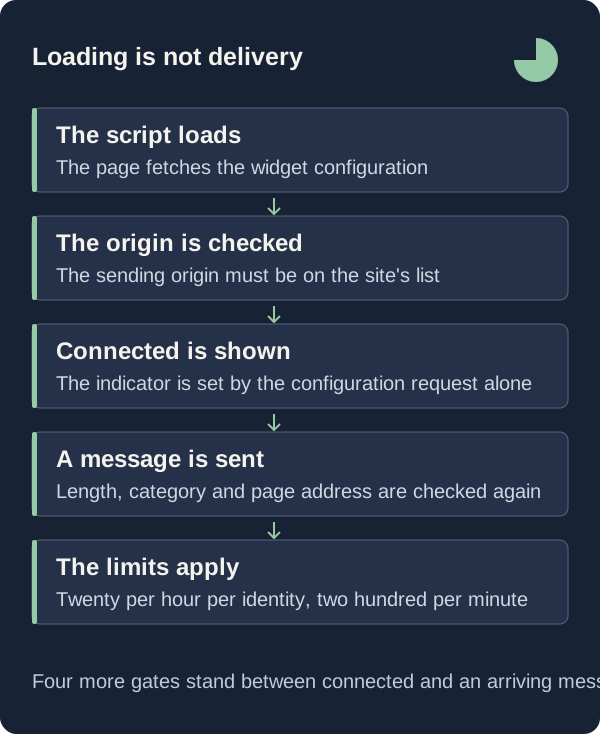
That check reads exactly one field, and only GET /widget/:key/config ever writes it. A green tag therefore proves that the script executed once on some origin already in the allowlist: the field is never cleared, so it stays green after you remove that origin, after you pause the widget, and after the page it loaded on is deleted. The panel labelled Preview is not the widget either; it is workspace markup, and its Feedback button opens the settings editor.
Delivery is a different request with a different set of failures. POST /widget/:key/feedback passes the same origin gate, then a schema, then a comparison of the submitted page address against that origin, then two rate limiters and the workspace allowance, and only then writes a row your team can read.
Register Every Origin Visitors Actually Reach
The common assumption is that registering the website address covers the website. It does not, because the comparison is an exact string match against the header: a request is accepted only when site.origins.includes(origin) holds for the Origin header the browser sent, and an origin is a scheme, a host and a port. The apex host and the www host are two different strings, and so are the application subdomain and the staging host.
When you save a website, the server derives the primary origin from the address you typed, prepends it to the origins you supplied, normalises each the same way and deduplicates through a Set; the schema caps the array at ten, and the primary origin occupies one of those places. In the settings modal, Customize your widget reveals the field Other allowed website origins, a textarea whose helper text says: "One exact origin per line, including https://. Add www and app subdomains separately."
Saving replaces that list rather than extending it: both handlers rebuild origins from the address plus whatever the textarea holds, so clearing the box and pressing Save website settings removes every extra origin added earlier. The discipline that follows is narrow: when a test fails, read the Origin the browser actually sent and add that one origin, rather than widening the allowlist until something works.
Send One Message That Exercises The Whole Path
A test message is the only evidence the path works end to end. The schema trims the message and requires 10 to 5,000 characters, the category defaults to idea, and the rating and email are optional. The stored title is the first line cut to 140 characters, so write a first line that identifies itself: a dated launch check reads better in a crowded list than the opening sentence of a paragraph.
The page address is checked against the origin, not merely parsed. The server rebuilds the submitted page_url and rejects anything that is not http or https, anything carrying a username or password, and anything whose origin differs from the Origin header, with "The feedback page must belong to this website." It then clears the query string and the fragment, which the widget has already cleared and shown to the visitor, so testing through a campaign link is safe.
Finish the test in the inbox rather than in the widget. Open the entry and confirm that Open source page points at the page you were on, that the viewport reads as two numbers clamped between 100 and 16,000, and that Selected shows the lowercased tag name when you used Point to something on this page. One behaviour matters before you test twice: a retry of the same payload returns the original entry, but any keystroke mints a new submission identifier, so editing and resending produces two inbox items.
Budget The Limits Before The Team Tests Together
The natural way to validate a launch is to ask everyone to try it at once, which is the approach the limiter treats as abuse. Three counters apply: 20 submissions per 3,600 seconds per website and identity; 200 submissions per 60 seconds per website; and 180 configuration requests per 3,600 seconds against the site key and that identity. Exceeding any of them returns "Too many requests. Please try again shortly."
The identity is not a raw address. It is an HMAC-SHA256 of the peer address, so the counter is stable per network rather than per browser, and a team sharing an office connection or one VPN exit counts as a single identity: twenty submissions per hour for the whole room. The windows are fixed rather than sliding, computed as the current time divided by the window length, so the hourly bucket resets on the boundary and not sixty minutes after the first attempt.
The allowance is separate, and test messages spend it exactly as visitors do. When the meter for the current usage period reaches the plan number, the submission fails with 429 and "This workspace's feedback allowance has been reached. Please contact the website directly." The trial allows 500 submissions over a period named EVALUATION rather than a month, so it never resets.
What This Check Does Not Tell You
A green tag and one delivered message prove that one browser, at one registered origin, completed one round trip, and no more. They prove nothing about your other registered origins, because each is matched as a separate string, and nothing about the origin you forgot, because the product stores one last_seen_at per website rather than one per origin. If you support four hosts, you owe yourself four tests.
There is no rejected-request log anywhere in the workspace. A 403 for an unregistered origin, a 404 for a paused widget, a 422 for a mismatched page address, a 429 for a rate limit or a spent allowance: none appear in the inbox, on the widget page or on Overview. The only signals the product exposes are the presence of last_seen_at and the arrival of feedback, which makes silence ambiguous. When nothing arrives, the candidates are that nobody wrote, that the origin is missing, that the widget is paused, that the owner is not an approved beta account, or that the allowance is spent; the checklist eliminates the last four so the first one means something.
Finally, a working widget measures nothing about the visitors who chose not to use it. The file header states the boundary in its own words: "GreatFeedback widget v2. No dependencies, no cookies, no passive recording." The workspace counts submissions, not impressions.
First Steps
Run these three in order on the day you publish, and again whenever anyone adds a hostname. Each ends in something you can point at.
- List every origin a visitor can reach — apex, www, the application subdomain, staging — in Other allowed website origins, one exact origin per line including https://, within the ten this field holds.
- Visit each registered origin as a visitor would, confirm the Feedback button renders in the corner your position setting names, and send one message whose first line is a dated launch check.
- Open the inbox entry, confirm the source page link, viewport numbers and any selected element are present, then set its status to archived so the test leaves the new queue.
Put The Allowlist In The Release Checklist
Hostnames change more often than widget code does. A marketing subdomain goes live, a preview host is promoted to production, a redirect is reversed so the apex serves instead of www: each changes the origin strings browsers send, and none touches the array that accepts or rejects a submission. Because saving replaces that array rather than extending it, the list can also shrink during an unrelated settings edit.
So the delivery test belongs beside the deploy. Keep the registered origins next to whatever document lists your hostnames, send one real message from each new host before announcing the change, and read the result in the inbox rather than in the tag. The loading check answers whether a script ran somewhere; only a message with a page, a viewport and a title answers the question you actually have, which is whether a visitor who takes the trouble to write to you reaches anyone at all.