The contractor opens the inbox for a client's marketing website on a Thursday afternoon, reads a visitor message saying that the pricing page never explains what happens when the trial ends, and writes three sentences underneath it: the wording that will change, the wording that will stay, and the person who agreed to it. On Friday morning the client's marketing lead opens the same message, in the same workspace, and reads those three sentences attached to the thing they describe.
The alternative is familiar to anyone who works on somebody else's website. The feedback arrives in a spreadsheet, the approval happens in a chat thread, the AI report travels as an attachment, and the reason behind a change survives only in the memory of whoever made it. Three months later, when the client asks why a paragraph was cut, nobody can answer without reconstructing a conversation nobody saved.
GreatFeedback does not fix this with a client portal, because it does not have one. It fixes a narrower problem, and the narrowness is what makes it dependable: membership belongs to a workspace, access to a website is checked inside every request that touches it, and the discussion sits in a comment thread attached to the visitor message or the tracked finding.
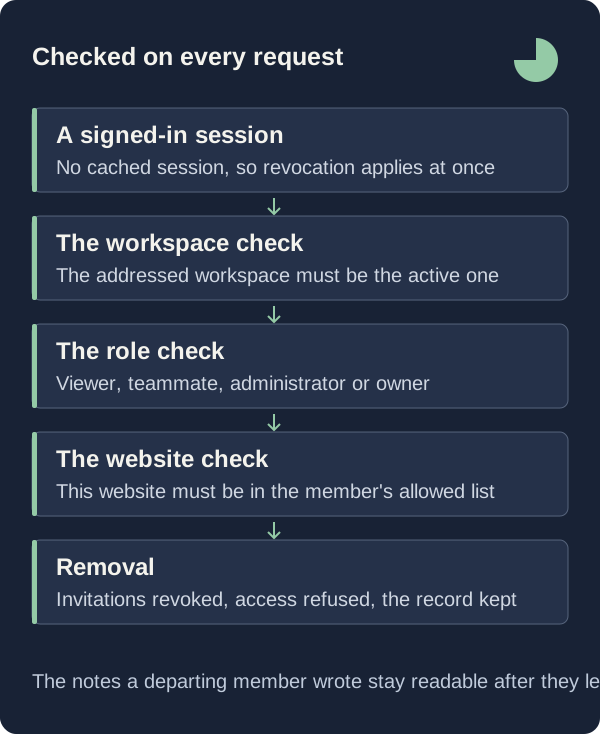
The boundary is therefore not a professional courtesy between people who trust each other. It is a check that runs inside the request: the server confirms that this member may see this website before it returns the feedback row, and a membership deleted one minute ago gets no grace period, because session cookie caching is switched off in this application.

Put Each Client Behind Its Own Workspace
The instinct, when you serve four clients, is to keep one workspace and add four websites to it, because Growth carries three websites and thirty teammates at $800 per month and Portfolio carries ten and one hundred at $2,000, both billed per workspace, and one subscription is easier to expense than four.
That reading treats the website as the unit of access, when the code treats the workspace as the unit of membership. Every invitation the Team settings form creates covers the whole workspace rather than one website, so the marketing lead you bring in for one client's homepage becomes a member of the workspace holding all four, and the inbox query returns rows for every website in it because a workspace-wide membership has no list of permitted websites to filter against.
Give each engagement its own workspace and move between them with the Active workspace select in the sidebar. The server supports that separation directly: before any workspace route runs, it compares the workspace named in the address against the one the session has active and answers "Switch to this workspace before continuing." when they differ, so one request cannot straddle two clients by mistake. A Focus workspace at $300 per month carries one website and ten teammates.
Choose The Role Before You Send The Invitation
Four roles exist, ordered viewer, member, admin, owner, and every permission check is a position on that ladder rather than a list of capabilities. The invitation form offers three of them in plain language: "Viewer · read & export", "Teammate · feedback & reviews" and "Admin · manage the workspace". The middle role carries a different name inside the database, which the server rewrites on the way out so that the interface and the member list say Teammate; the invitation email names the workspace and no role at all.
The threshold that matters for client work sits between Viewer and Teammate. Every feedback route admits a Viewer, who reads the inbox and downloads the CSV export, which returns up to 250 rows across ten fields and escapes any value beginning with an equals sign, a plus, an at sign or a hyphen. Writing crosses a second threshold: adding a comment, changing a status and tracking an AI finding each require at least the Teammate rung, checked twice in the same request, once against the workspace membership and once against the website the item belongs to. A stakeholder invited as a Viewer reads the entire record and cannot add one line to it.
Administration is narrower still. Only the owner may invite, change or remove an administrator, and nobody may change their own role through this route. Give the client side Viewer or Teammate, keep Admin with whoever answers for the subscription, and remember that every invitation reserves a seat before it is written: the seat count is compared against the plan allowance, and an eleventh teammate on Focus is refused with "Your workspace has reached its teammate allowance."
Make The Comment Thread The Record
An invitation is not a record. The record is the thread under each item, and its shape is plain: a note holds between 1 and 5,000 characters after trimming, and the server, never the browser, stamps it with the author identifier, the author name and the creation time. The panel lists the notes in creation order under the heading "Keep the context together", and the empty state asks for the thing that usually goes missing: "No team notes yet. Add the detail that will help someone take the next step."
What the thread hangs from carries its own provenance. A visitor message keeps the page address it was sent from, with the query string and fragment stripped. An AI finding you track arrives in the same inbox, marked as machine-generated rather than submitted and labelled "AI finding" rather than "Real visitor", carrying the exact quoted excerpt in a blockquote, the severity mapped onto priority, and a link back to the report it came from. Tracking the same finding twice creates nothing new: the lookup matches on the review and finding identifiers and returns the existing row.
Write the note knowing what the finding is, because the report states it before you do: "These are AI interpretations, not accounts from real visitors. Use them to form better questions and decide what to test." The stored limitations are worth quoting to a client who expects more: "Public-page content review. Visual layout, live interactions, page speed, accessibility compliance, and logged-in workflows were not tested." A suggestion to verify, recorded as a decision to make, keeps its status; the same sentence forwarded without that framing becomes a defect report nobody can reproduce.
Revoke Access The Moment The Engagement Ends
Removing a teammate does four things in one transaction: it revokes every pending invitation addressed to that email or bound to that user identifier, deletes their per-website rows, deletes the membership, and rewrites the stored member count so the seat returns. The dialog states the part a client cares about, that the person "will lose access to this workspace. Their existing feedback and notes will stay."
The removal takes effect on the next request rather than at the next sign-in, because session caching is switched off deliberately, both for the cached cookie and for its refresh, so every request resolves the session and the membership from the database again rather than trusting a copy held in the browser. The notes survive the person because the author name was copied onto the comment when it was written: the record still says who agreed to the change after that account is gone.
What This Does Not Tell You
There is no client-facing portal, no guest link and no read-only share address. Everyone who reads the record signs in with a verified email address, holds a membership and consumes one of the plan's seats: ten on Focus, thirty on Growth, one hundred on Portfolio, three on the 14-day trial. Public signup records interest only, so you cannot show the record to a reviewer you have not invited.
Per-website membership exists in the server and is enforced: such a membership carries one role for each permitted website, the inbox query is narrowed to that list, and a request for anything outside it is answered with "Website not found." No screen in the product creates one. The invitation form always grants the whole workspace, so treat per-website scoping as something the server will honour rather than something you can configure today, and separate clients by workspace instead.
The audit log is written and never read back. Invitation creation, revocation and acceptance, role changes, removals and every comment are recorded with an actor and a target, and no route returns them, so there is no activity history to put in front of a client who asks who changed what. Nor is a comment thread an approval process: it records what was agreed, next to the evidence that prompted it, and it does not replace the signature your contract asks for.
First Steps
Three actions turn the arrangement above into a working setup, in the order the product enforces them.
- Create one workspace per client engagement and add that client's website to it, so that the allowance you pay for, one website and ten teammates on Focus or three and thirty on Growth, matches a boundary you can name in the contract.
- Invite each person from Team settings with the role their work needs, Viewer for a stakeholder who reads and exports and Teammate for anyone who changes a status or writes a note, and copy the private link before leaving the page, because it is shown once and expires in seven days.
- Record every decision as a team note under the visitor message or tracked finding it concerns, naming the change agreed, what stays as it is, and the check that will confirm it, so the reasoning outlives the membership of the person who wrote it.
Hand Over The Record, Not The Recollection
The value of a shared record is collected at the end of an engagement rather than during it. When the contract closes you remove the memberships, the pending invitations are revoked in the same transaction, the seats return, and everything decided stays where it was decided: under the visitor message or the tracked finding, with a name and a timestamp on it.
That is a smaller promise than a client portal, and a more durable one. Give each client a workspace, spend seats on the people who need to read, write the decision as a note rather than a chat message, and the question asked three months later, why did we change this, has an answer that does not depend on anybody remembering.