A visitor reads your pricing page, opens the widget, and types six sentences about why the two cheapest plans look identical to her. Twenty minutes later a product lead reads that message in the inbox, agrees with it, and pastes five words into the team tracker: pricing plans unclear. The work is now scheduled. The evidence is not.
The next morning an engineer picks up that task and rebuilds what the product lead already knew: which page the visitor was on, what she actually wrote, whether a person or a review produced the observation, and what would count as a fix. All of it is recoverable by finding the original item again, which is the step nobody takes when the title looks self-explanatory.
GreatFeedback treats that moment as a payload rather than a paste. On a feedback item, and at the foot of a completed review, a card offers “Give this feedback a next step” and one sentence of promise: “Send the context, evidence, and source link to your team’s TopDo workspace.” Only a member with write access sees the button; an admin configures the connection once.
Press it and the server composes a document, stores it once, and posts it to your TopDo installation under a signature header and a delivery identifier. What comes back is a node identifier, which becomes a link stored beside the original item. What follows reads that document field by field, because a handoff you cannot inspect is one you cannot trust.

A Title And A Link Lose The Evidence
The instinct is to make the title the unit of transfer, because a tracker asks for one. In GreatFeedback a visitor feedback title is not an editorial summary at all: at intake the server takes the first line of the submitted message, truncates it to 140 characters, and stores that. A visitor who opens politely gives you a task named after her greeting.
A link is the usual compensation, and it works exactly as often as someone clicks it. What it leads to is substantial: the widget accepts a message of 10 to 5,000 characters, and the page URL is recorded with the query string and fragment stripped twice, on the visitor’s machine and again on the server. Neither the page nor the complaint survives a five-word paraphrase.
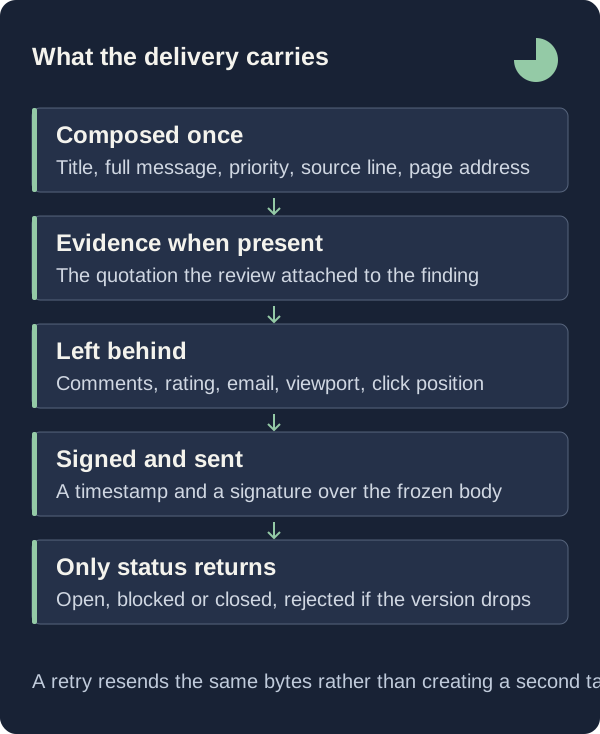
So the delivery leads with the title and carries the message underneath it, whole, as the text of the task. Nothing is condensed on the way out: the server removes carriage returns and applies a 12,000-character ceiling that a 5,000-character visitor message never approaches. The receiving team reads what the visitor wrote without opening a second application.
Read What The Delivery Body Actually Says
For a feedback item the body has a fixed shape: a first-level heading holding the title, the full message, a Priority line reading high, medium or low, and a source line that is one of exactly two strings. Visitor submissions carry “Source: Visitor feedback”. A promoted AI finding carries “Source: AI review finding; verify before implementing.” Then a Page line with the recorded URL, an Evidence line present only when the item has evidence, and a link back to the inbox item.
A completed review produces the same kind of document: a heading naming the reviewed URL, the stored summary, and one second-level section per surviving finding, each carrying the title, the reasoning, a Recommended change line, an Evidence line holding the exact quoted text, and a Page line naming where that quotation came from. A scope line counting the pages read and a link back to the report close it.
All of that travels inside a small JSON envelope: a delivery identifier, an event name of feedback.created or review.completed, the workspace and site identifiers, the source record identifier, the composed document, and the page URL. The quotations inside it were attached by the server rather than written by the model, which is why a promoted finding can announce itself as something to verify before implementing.
Sign The Handoff And Pin The Destination
The delivery is a POST to your installation’s GreatFeedback integration endpoint under three headers: the event name, the delivery identifier, and a signature written as t= followed by the Unix second and v1= followed by a hexadecimal HMAC-SHA256 digest over the timestamp, a period and the exact body being sent. TopDo recomputes that digest with the shared secret, so a body altered in transit is one it can refuse.
That secret never leaves storage in readable form: the form takes a signing secret of 20 to 300 characters, with a button that generates 32 random bytes as hex, and a read-only agent key of 10 to 300 characters, and both are encrypted together with AES-256-GCM under the workspace identifier as additional authenticated data, so one workspace’s ciphertext cannot be decrypted under another. The panel says it plainly: “Your connection credentials are encrypted and never shown again.”
The destination is checked before it is saved, not on the first delivery. Both addresses must be HTTPS origins with a root path and no query string, and GreatFeedback reads the destination parent node with the read-only key, storing the TopDo workspace identifier and the parent title so the panel can name where evidence will arrive. Refreshes are version-aware: a node from another workspace is refused, and a version lower than the one recorded leaves the saved status untouched.
Retry The Same Delivery Instead Of Creating A Second Task
A lost response is the usual cause of duplicate tasks: the obvious remedy is to press the button again, and the obvious result is two tasks describing one complaint. GreatFeedback keeps one delivery row per workspace, kind and source record, and composes the document only on the first attempt. A retry sends the identical stored bytes under the identical delivery identifier, and a delivery that already succeeded returns its stored node link without contacting TopDo.
Concurrency is handled by a 60-second lease and a random claim token: a second press while a send is in flight fails with “This delivery is already being sent. Wait before retrying.”, and a late response is refused rather than written over newer state. A 429 or a 5xx sets a backoff of two seconds, doubling per attempt but capped by an eight-doubling limit, so it never exceeds 256 seconds; any other rejection is reported as a configuration problem.
Acceptance is narrow on purpose: the response must be HTTP 200 and must carry a node identifier of letters, digits, underscores and hyphens before the link is written beside the feedback or review. A delivery is pinned to the API address and integration identifier it was created under, so retrying after the connection changed asks you to restore the previous connection. Sending is limited to 120 deliveries per workspace per hour.
What The Delivery Does Not Carry
The document is deliberately narrow. The comment thread does not travel; neither does the category, the rating, the visitor’s optional email address, the recorded viewport dimensions, the selected element, the normalised click coordinates, nor a promoted finding’s confidence level. If your team’s reasoning lives in a comment, the receiving engineer reads the visitor’s words and the recommendation without your qualification of them.
A whole-review delivery is thinner still. The per-finding severity and confidence, the review goal, the reviewer lens, the count of suggestions the evidence editor removed, and the stored limitations sentence about untested layout, interactions, speed, accessibility compliance and logged-in workflows are all absent; the only framing that travels is a scope line naming how many pages of text and links were read. The caution that matters most stays on the report page: “These are AI interpretations, not accounts from real visitors. Use them to form better questions and decide what to test.”
The link is one-way after the first attempt. Editing a title, changing a priority or resolving an item does not amend a task already sent, because the body was frozen when it was composed; only status flows back, and only when you ask for it. What returns is the node state, shown as Open, Blocked or Closed in TopDo, and anything else as “Status not checked”. The card is explicit about closure: “A closed task is ready for a fresh review; it is not yet a verified fix.”
First Steps
Configure once, send one item deliberately, and read what arrived before making this the standard route for the whole inbox.
- Ask a workspace admin to open the TopDo tab in Settings, enter the API address, the app address, the integration identifier and the destination parent identifier, add the shared signing secret and a read-only agent key, and press “Connect & verify destination”.
- Send one feedback item whose message already contains the evidence, open the resulting task in TopDo, and compare it line by line against the original: title, full message, priority, source line, page URL and the link back to the inbox item.
- Refresh the status from the card when you need the current state, and when it returns Closed, run a fresh review of the same page rather than recording the original feedback as verified.
Treat The Handoff As A Record, Not A Verdict
The argument is not that engineers are careless with links. It is that a title produced by truncating a sentence, detached from the page it describes, is an instruction without a reason, and an instruction without a reason gets implemented literally or not at all. Sending the message, the page, the priority, the provenance and the quoted evidence together removes the reconstruction step.
What the signature and the frozen body buy is narrower than it first appears: the task in TopDo contains exactly what GreatFeedback composed, at the moment it was composed, and pressing the button twice does not create a second copy of one complaint. They guarantee nothing about whether the change is worth making. That judgement stays with the people reading the evidence, which is where this delivery leaves it.